by Apex Vivus
Runs every night · no contract Get Deal Radar
How it works

Set up your market.
Review the opportunities it finds.

Follow the process from market setup to your morning worklist. Hunts, Search and Watching work in Deal Radar. Website activity, detailed repair analysis and connected seller history require Apex Vivus.

01

Create a hunt

You tell it where and what

Choose one county or up to 10 ZIP codes. Enable supported criteria such as pre-foreclosure, vacancy, absentee ownership or estimated equity. Set a daily target up to 100 new Hunt opportunities per territory, shared across its Hunts. Delivery depends on matches and coverage.

Setting up a hunt: three markets, the signals switched on, ten opportunities a day.
02

It hunts

Every night, whether you log in or not

Deal Radar checks supported sources for matching properties and relevant changes in your territory. It uses stored information and refreshes when needed. You do not need to buy or upload a list to start; existing lists can be imported separately.

03

Opportunities are scored

A signal on its own means very little

Signals help prioritize investigation. Recent events, deadlines, estimated equity and combinations of independent evidence can affect the ranking. Review Seller, Deal, Buyer and Contact scores alongside overall viability. Unknown information remains unknown; a high score is not proof that an owner will sell.

04

Owners are identified

Owner identity first. Optional contact lookup second.

Available ownership records identify the owner. If you enable contact lookup, Deal Radar separately searches for phone numbers and/or email addresses. 250 of those lookups are included each month, then about $0.10 per match, and a lookup that finds nobody is not charged.

Maria Delgado's record, built overnight: out-of-state owner, tax arrears, vacant, contact details found.
05

Existing leads keep being watched

Properties and owners you choose to follow

Add existing properties, owners or portfolios to Watching, including supported imports. Enabled monitors check them on the displayed schedule and flag relevant updates. Apex Vivus can add your seller history; an unrelated CRM is not read automatically.

The morning list: what was found, what became urgent, what woke back up.
06

Dead leads wake back up

Zombie Protocol

With Apex Vivus connected, a dormant lead can return for review when a supported change makes it relevant again. Your recorded offers, conversations and notes provide context. In standalone Deal Radar, add the property to Watching to track supported property changes.

John Smith: the March offer, last night's website visit, this morning's pre-foreclosure, 61 to 89.
07

Website behaviour becomes intelligence

Ghost Protocol

With Apex Vivus connected, identifiable visits and supported first-party activity can add context to an existing seller. Ghost Protocol can surface recoverable visitors where identity data is sufficient. It does not identify every anonymous visitor.

08

The deal economics are calculated

Before you pick up the phone

Available data supports preliminary values and deal screening. The 70% rule is a reference, not proof of a profitable deal. With Apex Vivus, EstiMate can analyze walkthrough photos and configured rates. Confirm condition, comparables, payoff and costs before making an offer.

The numbers: after-repair value, itemised repairs, and the most you can pay.
09

Humphrey explains why it matters

Drafted for you · sent by you

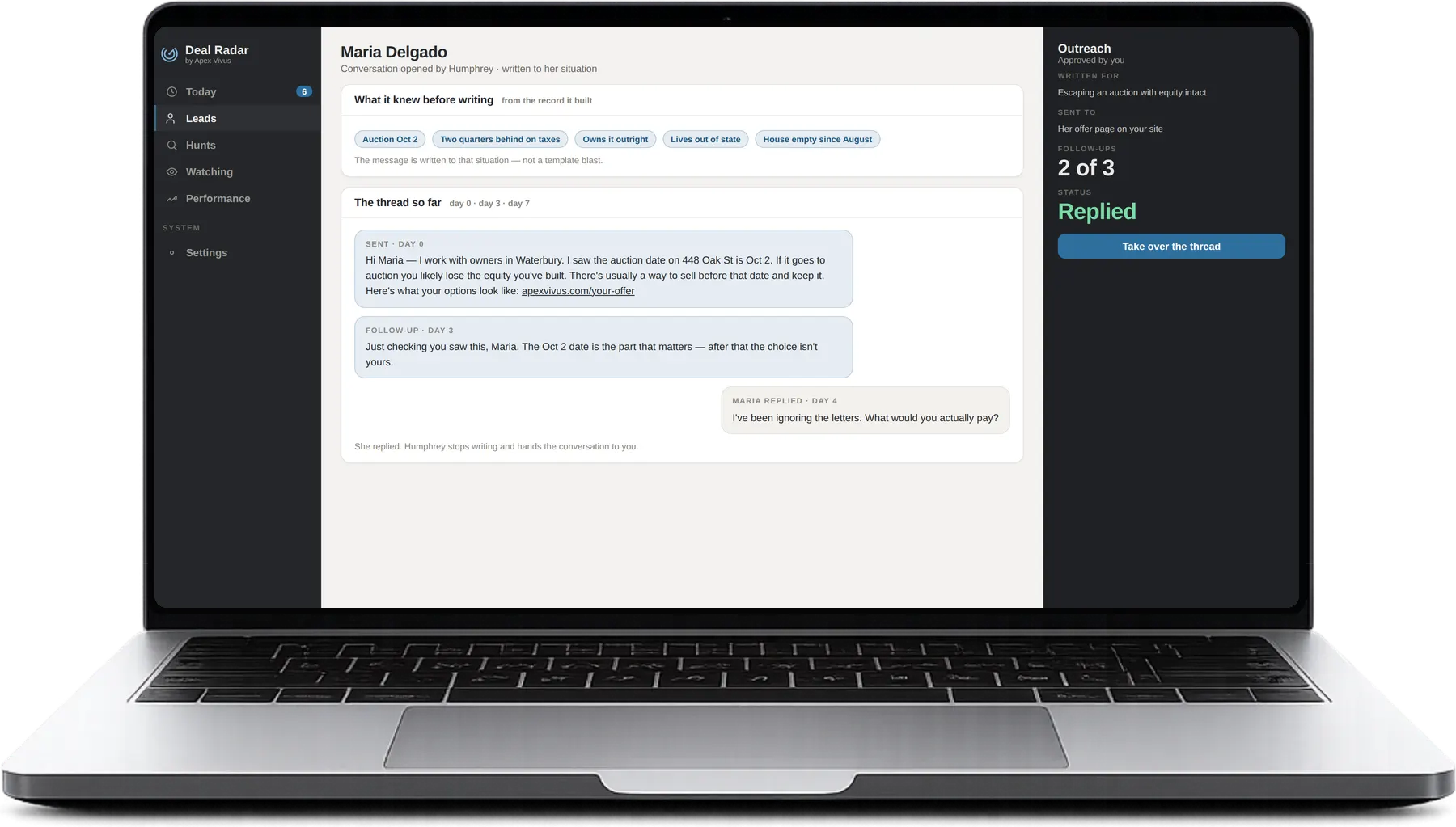
Each worklist item explains the available event, its source, relevant dates and why it was surfaced. Humphrey can draft an opener for you to review. You decide what to pursue and how to contact the owner.

The message drafted to Maria's situation, the follow-up, and her reply.
10

You get a worklist

A ranked list with the reason to act

Your worklist ranks the opportunities selected for review. New Hunt delivery respects your daily target and the 100-per-territory ceiling. Contact details appear when available or successfully looked up with your authorization. Volume varies; sample screens are illustrative.

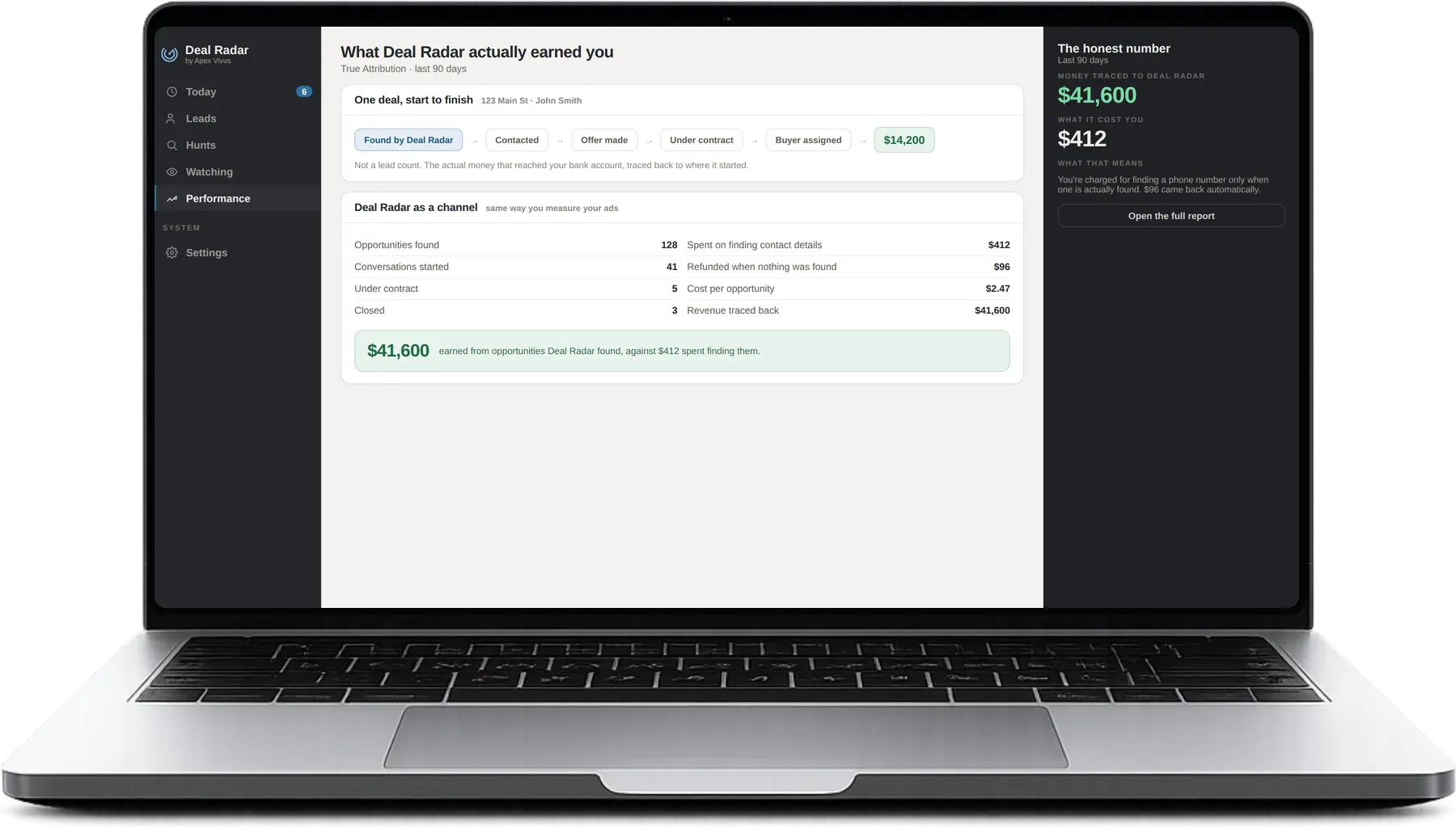
What the channel produced: the deal traced from found to paid.

And whenever you want to go looking yourself.

Everything above is the radar working on its own. You can also just go and look.

Hunts run automatically on your chosen criteria. Search is for your own research: explore a market or investigate a particular property whenever you need to.

Search queries and filters are included. Your account can display up to 250 property search results each day; a page of 25 results uses 25 slots. Search results do not enter your worklist automatically. Choose which ones to save, watch or pursue. Contact lookup is optional and separately billed.

Use Hunts for automatic discovery, Search for investigation and Watching for properties or owners you want to follow. Each serves a different step in your workflow.

That is the entire loop, and it runs again tonight.

Your active Hunts run nightly. Watches follow their enabled monitors and displayed schedules. Coverage, source delays and available matches determine what reaches your worklist.

Get Deal RadarMonth to month · no contract